Showing posts sorted by relevance for query Android Software. Sort by date Show all posts

Friday, 22 January 2016

Android N is Nutella or Nougat? Features Revealed...

Following the trend of naming Android updates with desserts by alphabetical order, Google’s Android N is going to be the successor to Android Marshmallow.
Android enthusiasts are fascinating over what name the ‘N’ will stand for even though Android M has not been updated by a lot of users. If one has to go by the rumors, the name is likely to be Nutella and here is the list of features and changes that might come with it.
The first feature that Android N is rumored to have is Multi-Window feature. Andrew Bowers from Google said that “we’d spoil the surprise of N if we shared all of them. Split screen is in the works!” Currently, it is said that multi-window is a “highly experimental” feature in Marshmallow, but Google is working on improving it and it will be officially released, it will be pushed to the Android tablets. If this happens, not only will it be useful for larger Android devices, but also pit against Apple’s iPad and their new software features.
The second feature might be a New Messaging Application, but it’s unclear whether or not this means that Hangouts will be pushed aside in order to make room for “Messaging”, the application which already reached India and parts of Africa and it’s competing against WhatsApp and Facebook Messenger. The Wall Street Journal has reported a number of times that this “new” messaging app would be smarter and more like a blending of Hangouts and Google Now, with answers available for whatever people ask it.
The third and most important change will affect Chrome OS, as it has been rumoured that the two operating systems will become one with Chrome folded into Android. This is something Google has apparently been working on for a long time and, while it has recently made some progress, the single OS isn’t expected to be ready until 2017, making it more likely that if any Android OS is to kill off Chrome OS it will be Android 8.0 “O”. For now the company has confirmed that both operating systems will continue to exist.
But Google wants to do more than put Android on more devices, Lockheimer revealed during his Fast Company interview. Google wants smart Android devices to talk to each other better in order to offer new features that right now aren’t possible. In terms of actual new features in Android N it’s a bit too early too tell, especially given that most Android users are still waiting for the Marshmallow upgrade. However, we will continue to update this article until Android 7.0 N’s release, including new rumours and information as we hear it.
Android N is expected to get its first outing at Google I/O 2016, which has now been confirmed to run between May 18, 2016 to May 20, 2016. Google will offer an Android N Developer Preview, which you will be able to install on its 2016 line of Nexus devices.

Monday, 2 November 2015

Honor reveals Phones set to get Android 6.0 Marshmallow


Honor India has announced that it will be rolling out Android 6.0 Marshmallow software version in the country to a range of its handsets beginning February 2016.

Honor India noted that the Honor 4C, Honor 6 Plus, Honor 7, Honor 6, and Honor 4X users in the country will be receiving the impending software version. Considering how much time smartphone manufacturers have taken in the past to roll out the new Android software to their handsets, Honor India's current roll-out timeline is impressive, however, those who were expecting it sooner might be disappointed.

Parent company Huawei recently announced on its Weibo channel that many of its handsets including the Ascend P8, Ascend P8 max, Mate S, Mate 7, Ascend G7, Ascend G7 Plus, and Ascend G8 will begin receiving the update in China starting November.

Separately, a report citing Huawei marketing executive Xi Zhao said that the company plans to beta test Android 6.0 on at least one of its device before releasing the stable version of Android 6.0. Zhao said that the Honor 7 users should expect to see a beta test for Android 6.0 Marshmallow in a few weeks.

It will be interesting to see the company's take on Emotion UI, its user interface for Android handsets. Many users have previously requested the company to tone down on customization and apps that it bakes in its lineup of smartphones and tablets.


Tuesday, 18 August 2015

Android “M” Is Now Officially Android Marshmallow

Google’s Android M is Marshmallow

After a month of running the preview version as Android M, Google has finally unveiled the official name for its new operating system and it will called Marshmallow. Google had been hinting at Marshmallow going by the teaser music video it released yesterday.
Googler Alex Ruiz just posted a picture of the statue over at Building 43 (the Android building) at Google HQ in Mountain View.

About Marshmallow:

Marshmallow is a sugar based candy that, in its modern form, typically consists of sugar, whipped to a spongy consistency, molded into small cylindrical pieces, and coated with cornstarch. Some marshmallow recipes have eggs in it.

About Android M:

Android Marshmallow is an release of the Android mobile operating system which will be available for Android users by September 2015. Android M was first unveiled at Google I/O on May 28, 2015, with the Android “M” developer preview was released on May 28, 2015, for the Nexus 5 and Nexus 6 phones, the Nexus 9 tablet, and the Nexus Player set-top box, under the build number MPZ44Q. The Developer Preview 3 was released August 17, 2015 for Nexus 5, Nexus 6, Nexus 9 and Nexus Player (MPA44G).
Along with finalizing the name, Google has also released the finished version of its Android 6.0 SDK and a third (and final) software preview that can be loaded on Nexus devices.
“The preview images are near final but they are not intended for consumer use,” Google said in a blog post. “Remember that when Android 6.0 Marshmallow launches to the public later this fall, you’ll need to manually re-flash your device to a factory image to continue to receive consumer OTA updates for your Nexus device.”

Friday, 14 August 2015

Windows 10 will automatically delete pirated Games, other Software!

Windows 10 is the first version of Windows where Microsoft is pitching its marquee operating system as a service instead of a standalone software product. One of the biggest changes to Windows has also gone unnoticed by most. Spotted by PC Authority, Microsoft has changed the End User License Agreement (EULA) for the OS, which now allows Microsoft to remotely delete pirated software on your machine.
"Sometimes you'll need software updates to keep using the Services. We may automatically check your version of the software and download software updates or configuration changes, including those that prevent you from accessing the Services, playing counterfeit games, or using unauthorised hardware peripheral devices. You may also be required to update the software to continue using the Services," reads the updated EULA agreement.
Now, this big change for a desktop class operating system. PCs in emerging markets like India and China are known to run pirated copies of software. In fact, in a country like India a high percentage of the computers are actually running pirated copies of the operating system itself.
Microsoft was also in a way forced to make Windows 10 a free upgrade including pirated users of Windows 7 and 8. People who were running pirated copies of Windows can upgrade to Windows 10 without any issues accept that the OS will keep letting user know that it is not a genuine copy. As for the functionality, Windows 10 is fully functional.

So how does Microsoft determine, if you're running pirated software? Well, there's no clarity on that. This could be problematic if you're playing games and are able to access services like Steam through illegal means or perhaps running illegal anti-virus software. There's also a privacy angle here as Microsoft will be keeping an eye on your system and what type of hardware and software you're running.
While this may not be to everyone's tastes, it has to be noted that Apple and Google both do a similar thing on their mobile platforms iOS and Android. Apple, though, doesn't do the same with its desktop platform OS X.
The difference here is that for Microsoft, Windows 10 is a operating system that will span across different hardware categories phones, tablets, notebooks, desktops, wearables, game consoles, and IoT hardware.
We have reached out to Microsoft for clarity on this issue and will update if we hear from them.

Saturday, 21 May 2016

Yu announces Project Highway, Marshmallow for Yureka and other phones

On Friday evening the company formally announced its in-house project to create better software for Yu phones. The company also said that starting today beta builds of Android Marshmallow, which are the result of the Project Highway, are available for four Yu phones.
These phones are Yureka, Yureka Plus, Yunique and Yuphoria. The Yutopia, which was launched a few months ago, is the odd-one out.
"Developers and contributors have been special to us. When we rolled out Project Highway, we wanted to get as many people on board as possible. Pleased to share that developer.yuplaygod.com is live as of NOW and happy to share today we are making available the open-sourced OS for (four Yu phones)," Yu founder Rahul Sharma wrote on the company's official user forum.
As we had written earlier, the Project Highway will give Yu ability to cook up unique software for its phones, especially now that the company's exclusive partnership with Cyanogen Inc is over. While the base of the Project Highway software will be stock Android, Yu will add several features to it. The most significant of these features is going to be the Around Yu.
At the same time, says Yu, the company will try to keep the look and feel of the software close to pure Android. For Yu, the Yunicorn that was supposed to launch on May 20 was likely to be the first phone running Project Highway software. But the launch of the phone was pushed forward. Now, it is slated to come to the market on May 31.
"Under Project Highway we will be curating source codes from multiple drop points, such as Google's AOSP repos, Chipset Vendors Repos, Various ROMs (where the community developers contribute), Internal YU customisation... and creating one manifest which will be able to support all YU based devices," wrote Rahul.
He said that the stable builds of the Marshmallow based Project Highway software will be available for various Yu phone in the next 30 days. 


Friday, 25 September 2015

Android 6.0 Marshmallow OTA Updates to hit the Nexus 5 & 6 starting 5th October

Even as Google gears up to announce two new Nexus smartphones on September 29 fresh reports have emerged indicating that its latest Android OS iteration, christened Android 6.0 Marshmallow will be coming to previous generation Nexus phones as early as October 5. Android M currently available as a beta preview is expected to go live for the first time on September 29 with the official launch of the new Nexus 5X and Nexus 6P.
According to Mobilesyrup , Android 6.0 Marshmallow will begin rolling out to the 2013's Nexus 5 and last year's Nexus 6 on October 5. The report quotes Telus which is Canada's second largest mobile provider as having leaked the info through its software release schedule. The Nexus 5 and Nexus 6 mention has now been removed from the schedule by Telus. But for the brief period that it was up folks back at Mobilesyrup were quick to grab and post a screenshot of the schedule that indeed shows that the Nexus 5 and Nexus 6 will start receiving Android M starting October 5.
Although, the report notes that dates are subject to 'change' as cited by Telus, October 5 doesn't seem all that surprising if you take into account how quickly older Nexus phones are known to get the latest update once Google pushes out its new Nexus device.
Take the Nexus 6 for instance. Officially announced on October 15 last year, the current-gen Nexus flagship was available for buy starting October 29. The Nexus 5, in that case began rolling out starting November 12.
This year, the new Nexus phones developed by LG and Huawei respectively are expected to be announced on September 29. Therefore, Android M hitting Nexus 6 (and Nexus 5) by October 5 could be a possibility. This also means the new Nexus phones may be available for buy a little earlier than the previous generation Nexus.
As for other devices, their schedule for getting the new Android M update shall vary depending on region and carrier as also how and when OEMs start rolling it out (after getting the desired code from Google, that is).
Android M is not what you call a 'major' update in Android release cycle. You can call it more of an incremental update that focuses on stability and performance improvements with only a handful of headlining features.

Friday, 31 July 2015

Turn your Old Android phone into a wireless Security Camera!


If the idea of a networked security camera that you can remotely view and receive alerts from appeals to you, read on as we show you how to turn older generation Android phones into sophisticated security cameras.

Why Would I Want to Do This?

Well, we hate to presume, but we imagine you opened this tutorial because you have something you want to keep on eye on. Whether that’s your backdoor to watch for delivered packages, your new ferret cage to see if Mr. Winks actually uses the super-deluxe hammock lounge on the top floor, or your kids in the backyard while you’re in the house tidying up, is your business.
We’re just here to help you do it cheaply with old hardware you likely have laying around already. The Android phone we used for the tutorial, an HTC Hero, can be picked up off eBay for $20-25 a fraction of the cost of Wifi security cameras, and the phone will offer a radically more customizable user experience.

What Do I Need?

2013-02-27_105909
For this tutorial you’ll need the following things:
  • One Android Phone with Camera.
  • One charging cable.
  • One copy of IP Webcam (Free) (for continuous streaming).
  • One copy of SECuRET SpyCam ($4.50) (for motion-activated capture and alerts).
  • Access to a Wifi network local to the Android phone.
  • (Optional) Remote access to the Wifi network to monitor continuous video feed away from home/work.
Why two different camera applications? During our testing we had trouble finding an application that could both stream continuous video in an effective and easy to access manner and issue motion-detection alerts effectively. Rather than have you set up a camera system that’s just kind of mediocre at both tasks, we’re highlighting a two prong approach where you can select the best app for your needs and desired level of monitoring.
If you want to get a notice whenever someone, say, drops a package off on your porch or opens your back gate, follow along with the first portion of our tutorial that details setting up SECuRET SpyCam.
If you want to generate a continuous live stream, like you would if you wanted to be able to continually check in on the results of an experiment or children playing in the backyard, follow along with the second portion of our tutorial detailing how to set up IP Webcam.
In addition, there are a few things worth noting before we proceed. First,  this tutorial is focused entirely on the software side of things. Because each physical phone and location of installation will be unique, it’s an exercise for the reader to find their own mounting solution for their Android phone-turned-security camera. In our testing we used a suction-cup mount intended to mount the phone to a car windshield as it worked well to mount the camera to windows and smooth surfaces.
Second, if you want to access your camera from outside the network we recommend doing so in a secure fashion. Configuring a VPN is outside of the scope of today’s tutorial but we have plenty of great tutorials on How-To Geek including How to Connect to a VPN on Android and How to Setup a VPN Server Using a DD-WRT Router to get you started.
Finally, if you are reusing one of your old phones we would strongly recommend performing a factory reset on the device and then updating it to the most current version of Android available. Stability is important when deploying a device such as a security camera, so removing any extra applications, freeing up as much memory as possible, and running the most recent stable Android release for your device are all important considerations. Refer to the documentation for your specific phone to reset it and update Android.

Configuring SECuRET SpyCam:

2013-02-27_110255

In all our tests of Android motion-detection software, SECuRET SpyCam came out ahead in every category. Its motion detection algorithms were the most consistent, it features tons of individual settings you can refine to help it work with the widest number of devices, it also features email and Twitter based notification as well as automated Dropbox-uploading, as well as the ability to capture not only photos but video segments too.
First, grab a copy of SECuRET SpyCam in the Play Store and install it to your device—if you’re wary of purchasing an app without test driving it first there is a demo copy available here.
After you have installed the application, launch it to begin the configuration process:
2013-02-27_111237
In the upper right hand corner of the display, next to the help icon, is the settings menu icon. Click on the settings menu. In our testing we found that leaving the majority of the default settings alone was ideal; however there are several settings that need configuration right out of the gate.
The first important decision is to decide whether you want the security camera to capture still photos or video segments when triggered. Navigate to General>Motion Capture Mode> and select either Photo or Video. Although we tested both functions, for the purposes of this tutorial we’re configuring the camera for photo capture. 2013-02-27_112327
While still in the General menu, select Photo Settings to configure photo and notification settings.
2013-02-27_112508
Here you can opt for a colour or black and white photo, what resolution you want the photos to be taken in (lower resolution if you’re just monitoring the UPS guy coming and going, higher resolution if you hope to capture a license plate or other identifying information), as well as whether or not your want the camera to capture multiple exposures of each triggered moment (you can set the burst capture mode up to 5 photos per trigger).
Finally under the Actions section you can turn on Email and Twitter notification. While there may be some application for live Tweeting your security camera images, we’re more interested in configuring the email service.
Select Email, then check Auto Email Captures, and then plug in the credentials for a Gmail account. Finally, plug in a delivery address for the alerts. You can customize the email’s Subject/Message lines, but we found no particular need to do so.
The next step is to configure Dropbox syncing. By default all captures are stored on the local device (and emailed to you if have email alerts enabled). We want to go a step further and sync the captures to Dropbox so we have a convenient backup and, should the device itself get taken, we still have the photos. Navigate to General>Dropbox to plug in your Dropbox login information and settings.
2013-02-27_114708
First, check Auto Sync Captures, then click Log In to authenticate SECuRET SpyCam with your Dropbox account. The final setting is to select whether you want the Dropbox syncing to occur over Wifi only or via Wifi and your cellular data plan.
Now that we’ve configured the basics, it’s time to test the camera out. We strongly recommend not messing around with the default settings until you’ve actually tried out your system—in almost every instance the default settings worked fine for us and required no further tinkering.
Exit back to the main menu and select Built-in Camera and press Start.
2013-02-27_121450
Once you press start you’ll see a screen like the one above—the smaller screen in the upper left hand corner is there to display the motion detection algorithm in action.
Since it’s a rather dreary, snowy, and Gray day outside, we’re going to use something a little more colourful for our test subjects this afternoon: some African Cichlids. Not only are the Yellow Lab test subjects brightly coloured but they’re extremely curious fish and we know it won’t take long for them to investigate the camera attached to the side of their tank. To start the actual detection mode tap the screen and then press the play button that appears in the lower menu bar.
It only takes a minute or two of waiting before one of the fish swims over to investigate:
2013-02-27_121658
The image is captured, stored to the device, and then an email alert is issued along with the file syncing to our Dropbox account. The email alerts are simple but they get the job done:
2013-02-27_123926
That’s all there is to it; once you’ve done the hard work of configuring the app and positioning your camera, there’s nothing left to do but check in on it periodically to make sure it hasn’t fallen off the window or been unplugged.

Configuring IP Webcam:

2013-02-27_133343
While SECuRET SpyCam was our favourite pick for motion-based capture, it has one glaring oversight which prevented it from being a one-stop-shop for our Android security camera needs: it doesn’t include a simple streaming function. If you want a security camera you can continuously monitor (not just see when it issues you an alert) you’ll need to install a streaming application for that purpose. Fortunately there is a well established, free, and robust solution in IP Webcam.
IP Webcam is a perfect tool for turning your Android device into a streaming security camera. You can monitor the video feed (and take photos from the camera) using any modern web browser, use free cam viewers like  IP Cam Viewer to monitor the camera from other Android devices, connect it into Skype, and even stream it right into media players like VLC.
Before we start actively monitoring the feed, however, let’s do some basic configuration (IP Webcam is even easier to setup than SECuRet SpyCam). First, install the application from the Play Store. Once the application is installed, launch it, and you’ll be dumped right into the configuration panel—seen above.
Much like we left the defaults alone in the previous section of the tutorial, we’re going to do the same here once you have tested the camera you can begin tweaking settings to meet your needs if necessary. Of the few settings we are going to tweak, the first is to scroll down and check Stream on device boot, we want our security camera to turn back on in the event that the Android device crashes and restarts.
The second setting worth looking into right away is the login/password setting. Since we’re the only ones with access to our Wifi network, we opted to make setting up and deploying our device easier by skipping this step.
2013-02-27_134010
Once you’ve tweaked these basic settings it’s time to position your device and start up the server. Scroll to the bottom of the configuration panel and click Start server.
2013-02-27_122646
You’ll see a screen like the one above—minus the fish of course, unless you’re also setting up your phone to monitor an aquarium.
At this point you need the IP address and port number of the server. It’s printed on the bottom of the screen (you can also click How do I connect? in the upper left hand corner. Navigating to the address provided yields a simple HTML page like so:
2013-02-27_134344
There you’ll find feed links and/or instructions for connecting IP Webcam to a wide variety of viewing sources including streaming it to media players, watching it directly in your browser via the Java plugin, and linking it to Android-based camera viewing apps. The fastest way to start monitoring the feed is to use the built-in Java view like so:
2013-02-27_135340
It’s not particularly elegant but it displays the video with very little lag. The solution we preferred was to open the video stream in popular video application VLC by running VLC, navigating to Media>Open Network Stream, and plugging in the play-list link:http://x.x.x.x:8080/playlist.m3u, where x.x.x.x is the camera’s address on the local network:
2013-02-27_122513
Watching it through VLC made it extremely easy to hit the record button to record a video of anything interesting that might crop up.
That’s all there is to it: with IP Webcam once you have the server up and running on the phone and you’ve selected one of the many viewing methods to peek in on your camera, you’re done.

Thursday, 17 March 2016

Stagefright Returns: Android smartphones at risk via videos


Researchers at Israeli software firm NorthBit have claimed to have exploited a newly found Stagefright bug to hack a into Android smartphones remotely.


This comes within an year after the first Stagefright bug was discovered by cybersecurity firm Zimperium Mobile Security in July 2015. It highlighted that Android smartphones could be hacked remotely by specially crafted media file delivered via MMS.


Later in October 2015, another exploit was discovered which allowed remote execution of malicious code in smartphones via .mp3 and .mp4 files.


The new exploit implementation, termed Metaphor, has been successfully tested on Nexus 5, LG G3, HTC One and Samsung Galaxy S5, according to the company's detailed research paper.


Stagefright is an Android operating system multimedia library based on C++ language. The victims can be lured to websites with a malicious video file that is capable of crashing it. Google had released a patch for the earlier vulnerabilities but it is yet to acknowledge this newly found 'Metaphor exploit'.


The NorthBit research paper depicts a way to bypass Address Space Layout Randomisation (ASLR). The researchers have claimed to create a 'working exploit' while bypassing ASLR on versions 5.0 - 5.1, which affects Android versions 2.2 - 4.0 as well. The report noted that Android versions 2.2 - 4.0 do not come with the ASLR memory protection process.

"Breaking ASLR requires some information about the device, as different devices use slightly different configurations - which may change some offsets or predictable addresses locations," the paper said.


Explaining the payload, the paper said, "It is possible to gain arbitrary pointer read to leak back to the web browser and gather information in order to break the ASLR".

Around 235 million Android smartphone run Android 5.0- 5.1 while another 40 million smartphones still run Android 2.x without ASLR.

Sunday, 10 January 2016

Here is how you can use your Android smartphone as Remote Mouse and Keyboard for your PC

Before we begin, you must know this “this process will only work with Intel based PCs”. Now first of all you have to get Android Remote Keyboard App and software.
How to Set Up Intel Remote Keyboard:
  • Download and install the Intel Remote Keyboard Host on your Windows PC. You will need to choose x86 or x64 depending on your Windows. If you aren’t sure what you are running, there are four easy ways to know if you’re on 64-bit Windows.
  • (Important: Make sure your Android and Windows devices are connected to the same Wi-Fi network.)
  • On your Android phone, tap the Windows device name.
  • Your Windows PC will now show a large QR code. Just scan it with your Android smartphone’s camera (following the on-screen instructions) and the two devices will be paired.
  • You’re all set!

What you can do:
The App is basically a virtual trackpad and keyboard for your computer. You can use it in portrait or landscape mode.
How to use Android as keyboard or mouse for PC
In portrait mode, your screen is divided into the trackpad area on the top and keyboard at the bottom. Intel’s keyboard looks much like any Android keyboard, but also has a Windows button, an Esc button, and the four arrow keys.
How to use Android as keyboard or mouse for PC

Stuff which should have been there:
There could be some enhanced controls to fully optimize the facility. First, there is no “continuous scrolling” , that means you have to touch scroll button many times for scrolling upto a large distance. Second there is no “direct volume control” , since it is always convenient to adjust volume by using a dedicated key than to use mouse. We firmly expect that these features will be added in the upcoming updates.

Thursday, 17 March 2016

Creo Mark 1 Android smartphone promises monthly software updates & features you’ve never seen before!

CREO (rebranded Mango Man Consumer Electronic aka Teewee streaming dongle makers), has put out a teaser for its own smartphone called Mark 1 promising an OS update every month.

It was reported in January that CREO had secured a $3 million funding from Sequoia India, Beenext Ventures and India Quotient to produce smartphones and develop a proprietary software OS.

CREO’s note about the Mark 1 reads, “At CREO, we’re committed to #MakeBetter Android. And because we want to leave no stone unturned, we’re building both, the Operating System and the Smartphone. With our OS, we’ll send to our users super relevant updates that’ll keep Mark 1 running as just new.”

The company says they will ship a big new feature with every update based on ideas and suggestions given by Mark 1’s community of users. CREO has not yet revealed the specs or other details about their Mark 1 smartphone and their new ‘OS’.


One of the issue with Android is, of course, the lack of an upgrade to the next level of OS for most smartphone users. We know that to some extent this is because every update for Android running Google Play services needs to certified and verified by Google, before it can be rolled out to users. Plus, updates require months of testing to keep out security flaws.

We’ll have to wait and see how CREO manages to roll out regular updates for its ‘OS’, which is technically still an Android as they themselves confess. So calling it an OS would be a bit of stretch, although developers can do that, even though it is a skin at the end of the day with Android at the core.

We’ve seen Chinese players like Xiaomi, OnePlus roll out regular updates for their UIs adding their own new features, so regular updates from manufacturers aren’t exactly revolutionary. Even in India, Lava’s Xolo launched Hive which was pushing updates requested by users in the community.

So it is not even the first Indian company to focus on updates.


Friday, 12 June 2015

News: Blackberry Devices will Feature Android

Reuters is reporting that Blackberry may be considering shipping new devices with Android after it has become apparent that the Blackberry 10 range was not enough to claw the company back from the brink. This news comes from four sources they have been in contact with over the sudden change in direction.
 The four sources, who requested that they not be named as they do not have authorization to discuss the matter publicly, claimed that the move to Android is part of a new strategy BlackBerry is using to change their focus on software and device management. It is not hard to imagine that this will either bring about an end to the Blackberry 10 line of devices or see the beginnings of a new line of Android devices to run along side it. This is expected to begin with a phone featuring a sliding keyboard as was seen briefly at Mobile World Congress earlier this year.
“We don’t comment on rumors and speculation, but we remain committed to the BlackBerry 10 operating system, which provides security and productivity benefits that are unmatched,” – Blackberry
Two of the aforementioned sources stated that the introduction of Android to Blackberry devices would make an excellent point regarding managing and securing multiple operating systems through the new Blackberry enterprise Service 12  (BES12). Regardless of their plans for possible future OS, Blackberry will have to make a pretty impressive turnaround if they still expect to be around in a few years time. The company that once housed 17,500 people was down to just 6,225 at the beginning of 2015 and has made further cuts since. It’s not hard to see why, as their user base has dropped from a reported 80 million to just 37 million in just a few years.
Blackberry stock
Blackberry share prices since their peak in 2011

It would certainly be interesting to see if this move will rescue the fallen company and how an OEM known for producing unaesthetic devices with an unpopular OS would fare in the incredibly fragmented and versatile world of Android. Even if an Android Blackberry does not prove to be popular, my guess would be that it will still outsell most of the recent devices made by BlackBerry, and that can only be a good thing.

Would you buy a Blackberry device running Android? Leave a comment below!

Saturday, 14 November 2015

Anyone can Hack your Android device with this Critical Vulnerability in Chrome

A security researcher has discovered a critical exploit in Chrome for Android which is capable of compromising virtually every version of Android smartphone and tablets running the latest Android.
Guang Gong  a security researcher from Quihoo 360 found the security vulnerability in Google’s Chrome browser for Android, which he recently presented during the MobilePwn2Own event at the PacSec security conference in Tokyo.
According to Gong, the vulnerability, if exploited, can allow the potential hacker to take the administrative control of the Android smartphone and install any malicious App or APK. While Gong has not made the inner workings of the exploit public, it is known that his vulnerability leverages JavaScript v8 to gain full administrative access to the victim’s phone.
According to Gong the bug is in the V8 JavaScript engine that comes packed with each Chrome installation. V8 is a JavaScript compiler written in C & C++, responsible for interpreting JS code fed into the browser, by converting it into machine code before executing it, gaining extra speed by doing so.
Gong demonstrated his PoC at PacSec where he used a regular Android smartphone to access a malicious link, which by leveraging the security exploit, installed another app on the phone, without any user interaction. Unlike similar Chrome exploits, the vulnerability discovered by Gong did not require chaining multiple bugs together to work or to gain root privileges.
“The impressive thing about Guang’s exploit is that it was one shot; most people these days have to exploit several vulnerabilities to get privileged access and load software without interaction,” PacSec organiser Dragos Ruiu told Vulture South. “As soon as the phone accessed the website the JavaScript v8 vulnerability in Chrome was used to install an arbitrary application (in this case a BMX Bike game) without any user interaction to demonstrate complete control of the phone.”
According to Register, Google security team immediately contacted Gong after his demonstration and rumors have it that the Chrome team is already getting a fix ready.  Gong may be eligible to receive an Android bug bounty reward for the vulnerability.

Monday, 10 August 2015

Google is planning to launch sub $50 Smartphones!

Google is planning a revamped Android One program in India, where it is rejigging its targets to create a sub $50 (Rs.3,200 approx) smartphone in the country. Reportedly, the company will ramp up investment in the country with the $50 smartphone project being at the heart of the investment.
Google's product czar Sundar Pichai launched Android One in India in September 2014, but the initiative has received a lukewarm response at best. Initially, Google planned on making high quality sub $100 (Rs.6,400 approx) smartphones running unmodified Android, with Google handling the software updates.
More recently, Google partnered with Lava mobile to create a more expensive Android One smartphone called the Pixel V1, which also is the first Android One device to have a large screen. The approach with the Pixel V1 has been different from what Google adopted for the initial wave of devices.
However, despite this, even Rajan Anandan, Google's MD for India and South Asia was quoted in the report saying that it the program had "not lived up to expectations," as he cited supply chain issues, with the availability of products.
More importantly, Anandan claimed that the sweet spot for the program in a price sensitive market like India would be more between $31 and $47 ( Rs.2,000 and Rs.3,000) than the initial target of making phones that cost less than$100.
For Google, Android One is important, though products under the branding have struggled to compete against phones from Chinese brands like Xiaomi, Lenovo and local brands like YU.
The Mountain View based company is in a rat race with companies like Facebook and also local companies which are making products tailored for the slow networks of the country and price sensitive customers.
The company has also managed to localise its key services like Google Now, YouTube and Maps. It also wants to focus more on things like local search, an area where it faces competition from Mumbai based startup JustDial.
In fact, alongside the Android One launch last year, Google announced that it had made YouTube videos available offline in India owing to the poor quality of the network in the country.
That said, as India doesn't offer much in terms of digital ad revenue, Google's main cash-cow, the company is focussing on playing the long game by ramping up investment in projects like Android One.
"Don't get me wrong, the revenue is interesting but . . . we're here really because 10 years from now a billion Indians will be online and when we have a billion Indians online we think that’ is going to make a huge difference to the global internet economy," said Anandan.

Thursday, 12 November 2015

Now you can try Firefox OS on your Android Smartphone using an App


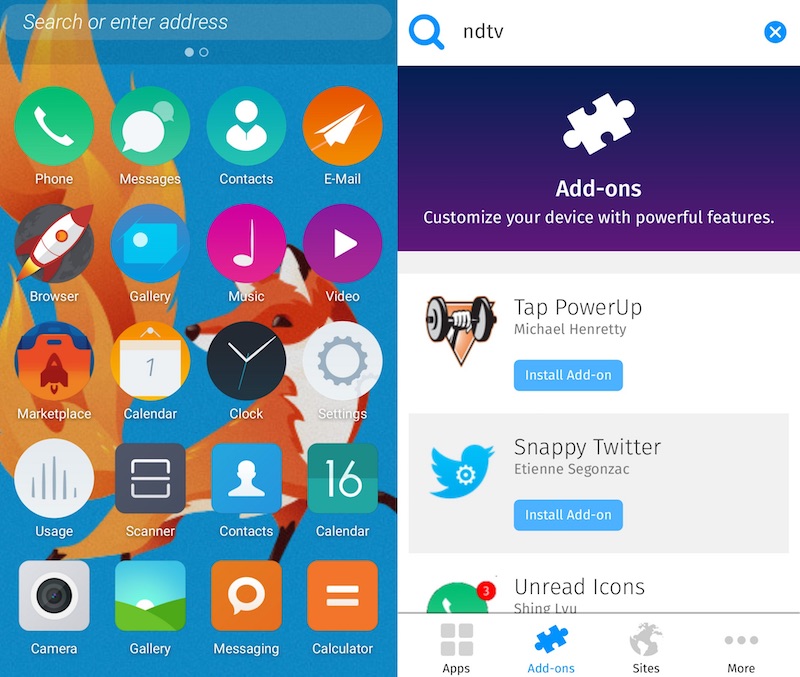
You can now try Firefox OS on your Android handset without flashing a ROM on your device. Mozilla has released a developer preview of its mobile operating system that can be installed on Android devices as an app.

Firefox OS 2.5 Developer Preview acts as an Android launcher that can replace one's current home screen to replicate Firefox OS' interface and bring additional features. Users also get access to Firefox's Marketplace from where they can download apps and add-ons.

Users also get access to the Firefox Browser, which comes loaded with many privacy-centric features including the ability to enable tracking protection from websites and advertisers. The browser also lets you pin shortcuts to the websites you like on the home screen - turning them into Web apps.

In our test, we observed that the app was slightly slow which is understandable as the app is in its preview phase. The app also seems to have been designed for an entry-level handset that presumably comes with a low-resolution screen. On our test Android device with FHD display, the icons and the interface in general appeared to be blown up. Even after making some adjustment in the settings, things still looked bloated.

For those unware, Firefox OS is an open-source, Linux-based mobile operating system meant for smartphones. The lightweight operating system uses open Web standards such as HTML5 and open Web APIs. It was first unveiled in February 2012, since then a handful OEMs have launched Firefox OS powered handsets, with India's Intex and Spice being some of the recent partners.

Over the years, the traction of Mozilla's mobile operating system has remained negligible. A ROM for Firefox OS has been available for quite some time, but it required users to manually flash their device and replace the existing Android software. The move to make it available as an app could give Firefox OS more exposure.

The installation file weighs around 90MB and is available for download from the company's website and not the Play Store.